
LazyAdmin
ZCP Study Guide: Zerto Certified Professional Exam Q&A | Lazy Admin Blog

Ready to become a Master of Disaster? If you are preparing for the Zerto Certified Professional (ZCP) exam, you know that understanding the nuances of Continuous Data Protection (CDP) is key.
Below is a quick-reference study guide based on the core competencies of the Zerto 4.5+ curriculum. We’ve highlighted the correct answers to help you review.
ZCP Practice Exam Questions
1) After performing a failover operation (Test, Live, Move) Zerto allows you to generate a report detailing the steps performed during the operation.
- True
- False
2) VPGs can only protect virtual machines running Mac OS X or Windows XP and newer.
- True
- False (Note: Zerto is generally OS-agnostic as it operates at the hypervisor replication level.)
3) To recover a single VPG after a corrupted database, which of these operations would be most effective?
- Journal file-level restore
- Offsite clone
- Live failover
- Backup restore
4) ZVR’s Journal is stored where?
- Production/source site
- Recovery/target site
- Both
- Neither
5) During a VPG sync, which of the following operations can be performed? (Select all that apply)
- Add a VM to the group
- Remove a VM from the group
- Change length of Journal history for the group
- Change hard limit of Journal size for the group
6) Offsite Backups for a VPG should be scheduled to run at least every four hours, but no more than every 12 hours.
- True
- False
7) How much memory can be allocated to a Virtual Replication Appliance (VRA)?
- 1 GB
- 3 GB
- Between 1-16 GB
- Between 2-8 GB
8) If both sites (target/recovery and source/production) are up, healthy, and accessible, which VPG-level operation is most appropriate?
- Live Failover
- Move/migration
- Offsite Clone
- JFLR
9) What basic method does ZVR use to protect data and applications?
- VM-level continuous replication
- Scheduled and on-demand snapshots
- Daily delta syncs
- Guest/agent-based replication
10) ZVR cannot function across different hypervisors, storage configurations, or host OS versions.
- True
- False (Note: Cross-replication between VMware and Hyper-V is a core Zerto strength.)
11) What must be true for a Move operation to be effective? (Select all that apply)
- Both source (or production) and target (recovery) sites are up and accessible
- Each VM in the VPG has an up-to-date Journal
- The very latest copy of the data is required
- One of the site’s hosts has either a new VRA installed or an upgraded VRA
12) A fully configured ZVM on each paired site—e.g. production and recovery—requires which of the following? (Select all that apply)
- Adding a site-specific license under Site Settings
- Creating matching VPGs on each site
- Installing VRAs on that site’s host(s)
13) Enabling auto-commit will always provide 30 minutes to validate the results of a failover before committing the changes.
- True
- False (Note: The timeout is configurable.)
14) ZVR has built-in support for scheduled bandwidth throttling that can work with or without other hardware/software also managing this.
- True
- False
15) What characterizes the kinds of VMs you should group together in the same VPG?
- Each are using the same datastore or volume for storage
- They need to maintain consistency with each other and all be failed over or recovered together
- All are running both the same OS and same hypervisor
- The journal is sized the same on each VM
16) Adding a VM to an existing VPG means… (Select all that apply)
- The entire VPG will be re-synchronized to ensure group consistency
- The VPG protection will need to be paused before adding the additional VM
- A checkpoint will be automatically inserted in the Journal prior to adding the VM
- A Live Failover cannot be executed until the updated VPG is fully synchronized
17) What is the Journal?
- Audit trail to track which operations were performed and when
- Series of checkpoints tracking block-level changes within VMs
- Detailed list of every snapshot, whether automatic or manually generated snapshots
- Compliance record of each VPG’s replication status at any given checkpoint
18) The ZVR installer includes which of the following components? (Select all that apply)
- Local copies of the ZVR documentation specific to your hypervisor
- One license key for each site you’ll use with Zerto
- Microsoft .NET Framework in case the machine does not already have it installed
- VRA template for a custom-designed Zerto VM
- A Virtual Backup Appliance (VBA) for managing backups
19) If you needed to test the failover of an entire virtualized datacenter, what best practices should be followed? (Select all that apply)
- Perform the test during off hours or on the weekend
- Clone the VPGs you want to test prior to starting the failover test
- Use an isolated/fenced network for testing
- Always stop the test from within ZVM and not your hypervisor’s management console(s)
- Provision a sandbox where ZVR can deploy the test VMs
20) What is a Virtual Replication Appliance (VRA)?
- Lightweight agent installed on each VM in a protection group
- Snapshot engine that powers the ZVR Journal
- Custom Linux VM performing continuous replication
- A hypervisor plugin/add-on to manage cross-hypervisor replication
21) ZVR 4.5 allows for Journal Compression to increase storage capacity for journal history.
- True
- False
22) If the hypervisor service/admin account provided during installation is incorrect, ZVR will still proceed with the installation and ask for re-validation after installation is complete.
- True
- False
23) When configuring a Failover Test network, what is Zerto’s recommended best practice?
- Test and production network should be the same to ensure consistency
- Test network should be isolated/fenced
- The ZVM should be on a test network
- Pause replication on production network when using a test network during a test
24) What operating system is running on the VRA virtual machine?
- Ubuntu
- Debian
- Red Hat Enterprise Linux
- Windows Server 2012
25) What VPG configuration option would give you the ability to stagger when and how your protected VMs start?
- Bandwidth Throttling
- Re-IP
- Pre/Post Operation Scripting
- Boot Order Groups
Level Up: Becoming a Zerto Certified Professional (ZCP) | Lazy Admin Blog
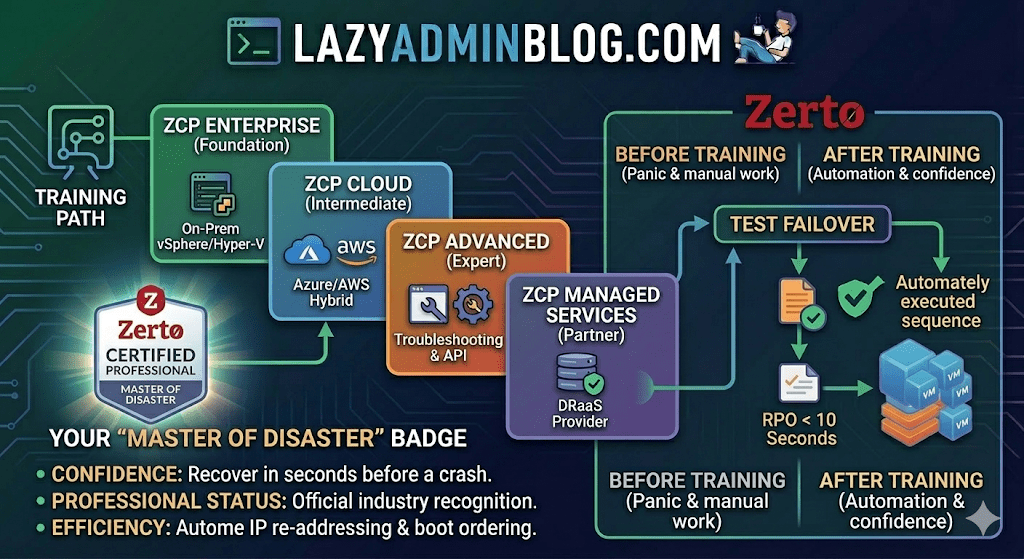
In the world of Disaster Recovery, there are two types of admins: those who panic during an outage, and those who have “Master of Disaster” status.
If you’re looking to join the elite ranks of the latter, it’s time to talk about Zerto Certified Professional (ZCP) training. While the original ZVR 4.5 training was a game-changer for its time, Zerto’s training ecosystem has evolved significantly since then to keep pace with modern cloud and ransomware threats.
What is ZCP Training?
Zerto Certified Professional (ZCP) is the official technical certification program designed for customers and partners. It moves you beyond the basics of “click and replicate” into the deep engineering of Continuous Data Protection (CDP).
The current curriculum has shifted from just “Basic” to a more modular, role-based approach available through the myZerto University platform.
Key Learning Pillars:
- Architecture & Installation: Setting up the Zerto Virtual Manager (ZVM) and Virtual Replication Appliances (VRAs).
- VPG Management: Creating Virtual Protection Groups (VPGs) to keep multi-VM applications consistent.
- The “Time Machine” (Journal): Master file-level restores and point-in-time recovery to defeat ransomware.
- The Big Red Button: Coordinating Test Failovers, Live Failovers, and Move operations without breaking a sweat.
Is it still “Basic”?
Zerto has streamlined its certifications into several paths to match your specific environment:
| Certification | Level | Focus Area |
| ZCP Enterprise | Foundation | Core vSphere/Hyper-V to On-Prem replication. |
| ZCP Azure/AWS | Intermediate | Hybrid Cloud DR and migration to public clouds. |
| ZCP Advanced | Expert | Complex troubleshooting, multi-site, and API automation. |
| ZCP Managed Services | Partner | Specifically for DRaaS (Disaster Recovery as a Service) providers. |
Why Bother Getting Certified?
- Confidence: Knowing exactly how the journal works means you can recover data from seconds before a crash.
- Professional Status: It officially recognizes you as a “Master of Disaster” within the community.
- Efficiency: You’ll learn the “Lazy Admin” way to automate IP re-addressing and boot ordering, so you don’t have to do it manually during a crisis.
How to Get Started
- Access: Head over to the myZerto Portal. (Note: You still need to be a customer or partner to access full technical training).
- Time Investment: Most foundational courses take between 90 minutes and 3 hours of self-paced e-learning.
- The Exam: You’ll typically need a 75% or higher to pass. The exams are online, unproctored, and refreshingly focused on real-world scenarios rather than trivia.
Lazy Admin Tip: Don’t just watch the videos. If you have a lab environment, try to break a VPG and see how the ZVM alerts you. Real learning happens when the lights go red!
Fixing Corrupt Image Profiles on ESXi | Lazy Admin Blog

We’ve all been there—a patch remediation task in vSphere Update Manager (VUM) or vSphere Lifecycle Manager (vLCM) gets interrupted (shoutout to that one colleague!), and suddenly your ESXi host is in a “zombie” state.
If you see the dreaded “Unknown – no profile defined” error, your host has lost its identity. It no longer knows which VIBs (VMware Installation Bundles) should be installed. This is usually caused by a corrupt imgdb.tgz file.
We’ve all been there—a patch remediation task in vSphere Update Manager (VUM) or vSphere Lifecycle Manager (vLCM) gets interrupted (shoutout to that one colleague!), and suddenly your ESXi host is in a “zombie” state.
If you see the dreaded “Unknown – no profile defined” error, your host has lost its identity. It no longer knows which VIBs (VMware Installation Bundles) should be installed. This is usually caused by a corrupt imgdb.tgz file.

The Symptom: Missing Image Profile
When an image profile is empty or corrupt, you cannot install patches, remove drivers, or perform upgrades. ESXi relies on the image database to maintain consistency.
How to Diagnose a Corrupt imgdb.tgz
Before you resort to a full host rebuild, verify the file size of the database. A healthy imgdb.tgz is typically around 26 KB. If yours is only a few bytes, it’s corrupted.
SSH into the host.
Locate the files:
cd /vmfs/volumesfind * | grep imgdb.tgz
Note: You will usually see two results (one for each bootbank).
Check the size:
ls -l <path_to_result>/imgdb.tgzIf the size is tiny (e.g., 0-100 bytes), the database is toast.
The Fix: Borrowing a “Known Good” Profile
Instead of a time-consuming reinstall, you can manually restore the database from a healthy host running the exact same version and patch level.
Step 1: Export from a Healthy Host
On a working ESXi host, copy the healthy database to a shared datastore:
cp /bootbank/imgdb.tgz /vmfs/volumes//Step 2: Restore on the Corrupt Host
On the host with the issue, move the good file to /tmp and extract it to access the internal VIB and Profile metadata:
cp /vmfs/volumes//imgdb.tgz /tmpcd /tmptar -xzf imgdb.tgzStep 3: Rebuild the Database Directories
Now, manually place the healthy metadata into the system directories:
Copy Profiles:
cp /tmp/var/db/esximg/profiles/* /var/db/esximg/profiles/Copy VIBs:
cp /tmp/var/db/esximg/vibs/* /var/db/esximg/vibs/Replace Bootbank File:
rm /bootbank/imgdb.tgzcp /tmp/imgdb.tgz /bootbank/
Step 4: Finalize and Persist
To ensure these changes survive a reboot, run the backup script:
/sbin/auto-backup.shSummary Table: Resolution Options
| Option | Effort | Risk | When to use |
| Rebuild Host | High | Low | If you don’t have a matching “known good” host. |
| Manual File Copy | Low | Medium | When you need a fast fix and have a twin host available. |
RDP Rescue: How to Fix Remote Desktop Issues Without a Reboot | Lazy Admin Blog

If you can reach a server via ping or the VM console but RDP is failing, you can often “kick-start” the service by toggling specific registry keys. This forces the Terminal Services stack to re-read its configuration without dropping the entire OS.
1. The Firewall Check
Before diving into the registry, ensure the Windows Firewall isn’t blocking Port 3389. If you have console access, try disabling it temporarily to rule it out.
- Quick Command:
netsh advfirewall set allprofiles state off
2. The “Deny” Toggle (The Most Common Fix)
Sometimes the registry says RDP is allowed, but the service isn’t honoring it. Toggling the value can reset the listener.
Path: HKLM\SYSTEM\CurrentControlSet\Control\Terminal Server
- fDenyTSConnection: Should be 0. (If it’s already 0, change it to 1, refresh, then back to 0).
- fAllowToGetHelp: Should be 0 to ensure Remote Assistance isn’t conflicting.
3. WinStation Listeners (RDP & Citrix)
If the main switch is on but the specific “listener” is disabled, you’ll get a “Connection Refused” error.
For Standard RDP: Path: HKLM\System\CurrentControlSet\Control\TerminalServer\WinStations\RDP-Tcp
- fEnableWinStation: Must be 1. Toggle this (1 -> 0 -> 1) to reset the listener.
For Citrix Servers (ICA): Path: HKLM\System\CurrentControlSet\Control\TerminalServer\WinStations\ICA-Tcp
- fEnableWinStation: Must be 1.
4. Port Verification
Ensure the server is actually listening on the standard port. If someone changed the RDP port for “security,” your connection will fail.
Path: HKLM\System\CurrentControlSet\Control\TerminalServer\WinStations\RDP-Tcp
- PortNumber: Should be 3389 (Decimal).
Test it from your workstation: tnc <ServerIP> -port 3389 (PowerShell) or telnet <ServerIP> 3389
5. The Winlogon Block
In rare cases, the entire Winlogon station for terminal services is disabled at the software level.
Path: HKLM\SOFTWARE\Microsoft\Windows NT\CurrentVersion\Winlogon
- WinStationsDisabled: Must be 0. If set to 1, no one can log in via RDP regardless of other settings.
Lazy Admin Tip 💡
If you can’t get to the console, you can change these registry keys remotely from your workstation! Open Regedit, go to File > Connect Network Registry, and enter the target server’s name. You can perform all the toggles mentioned above without ever leaving your desk.
#WindowsServer #RDP #SysAdmin #Troubleshooting #ITOps #TechTips #Networking #RemoteDesktop #LazyAdmin #ServerManagement
- ← Previous
- 1
- 2