
CDP
Zerto vs. vSphere Replication: Which DR Strategy is for You? | Lazy Admin Blog
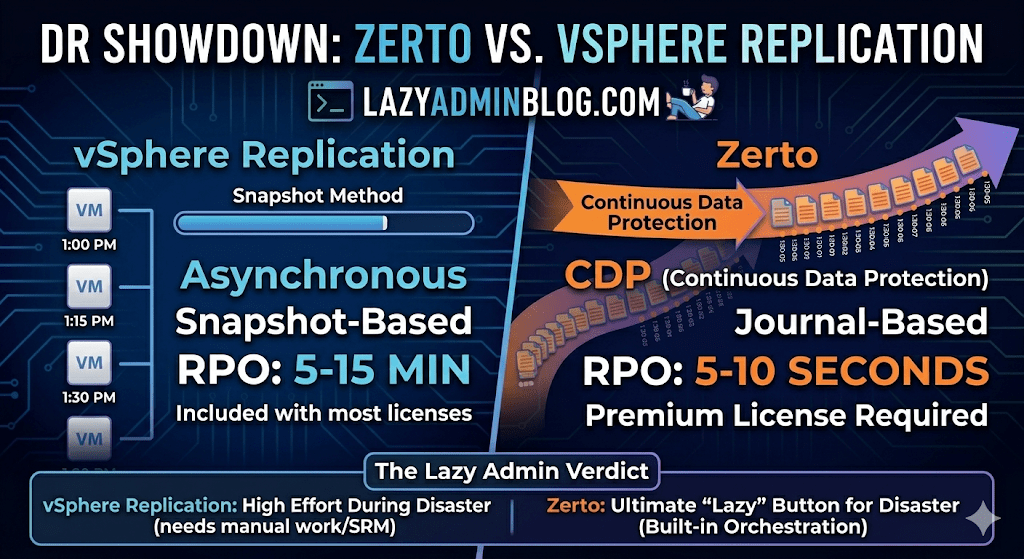
When it comes to Disaster Recovery (DR) in a VMware environment, there are two names that always come up: vSphere Replication (VR) and Zerto.
One is often “free” (included in most licenses), while the other is a premium enterprise powerhouse. But in 2026, with the shifts in Broadcom’s licensing and the rise of ransomware, the choice isn’t just about price—it’s about how much data you can afford to lose.
The Contenders
1. vSphere Replication (The Built-in Basic)
vSphere Replication is a hypervisor-based, asynchronous replication engine. It’s integrated directly into vCenter and captures changed blocks to send to a target site.
- Best For: Small to medium businesses with “relaxed” recovery goals.
- Cost: Included with vSphere Standard and vSphere Foundation subscriptions.
2. Zerto (The Gold Standard for CDP)
Zerto uses Continuous Data Protection (CDP). Instead of taking snapshots, it uses a lightweight agent on each host to intercept every write in real-time and stream it to the DR site.
- Best For: Mission-critical apps where losing 15 minutes of data is a catastrophe.
- Cost: Licensed per VM (Premium pricing).
Key Comparison: RPO and RTO
In the world of “Lazy Adminning,” we care most about RPO (Recovery Point Objective – how much data we lose) and RTO (Recovery Time Objective – how fast we get back up).
| Feature | vSphere Replication | Zerto (HPE) |
| Replication Method | Snapshot-based (Asynchronous) | Journal-based (CDP) |
| Best RPO | 5 to 15 Minutes | 5 to 10 Seconds |
| Point-in-Time Recovery | Limited (up to 24 instances) | Granular (Any second within 30 days) |
| Orchestration | Requires VMware Site Recovery Manager (SRM) | Built-in (One-click failover) |
| Snapshots | Uses VM Snapshots (can impact performance) | No Snapshots (Zero impact on IOPS) |
Why Choose vSphere Replication?
If you have a limited budget and your management is okay with losing 30 minutes of data, VR is the way to go.
- Pros: It’s already there. No extra software to install besides the appliance. It works well for low-change workloads.
- Cons: It relies on snapshots, which can cause “stun” on high-load SQL servers. Without adding SRM (Site Recovery Manager), failover is a manual, painful process of registering VMs and fixing IPs.
Why Choose Zerto?
If you are running a 24/7 shop or protecting against Ransomware, Zerto is king.
- Pros: The Journal is a time machine. If ransomware hits at 10:05:30 AM, you can failover to 10:05:25 AM. It also handles IP re-addressing and boot ordering natively.
- Cons: It’s an expensive add-on. It also requires a “Virtual Replication Appliance” (VRA) on every host in your cluster, which uses a bit of RAM and CPU.
The Verdict: Which one is “Lazy”?
- vSphere Replication is lazy at the start (easy to turn on), but high-effort during an actual disaster (lots of manual work).
- Zerto is a bit more work to set up but is the ultimate “Lazy Admin” tool during a disaster—you literally click one button, walk away, and grab a coffee while the entire data center boots itself at the DR site.
Level Up: Becoming a Zerto Certified Professional (ZCP) | Lazy Admin Blog
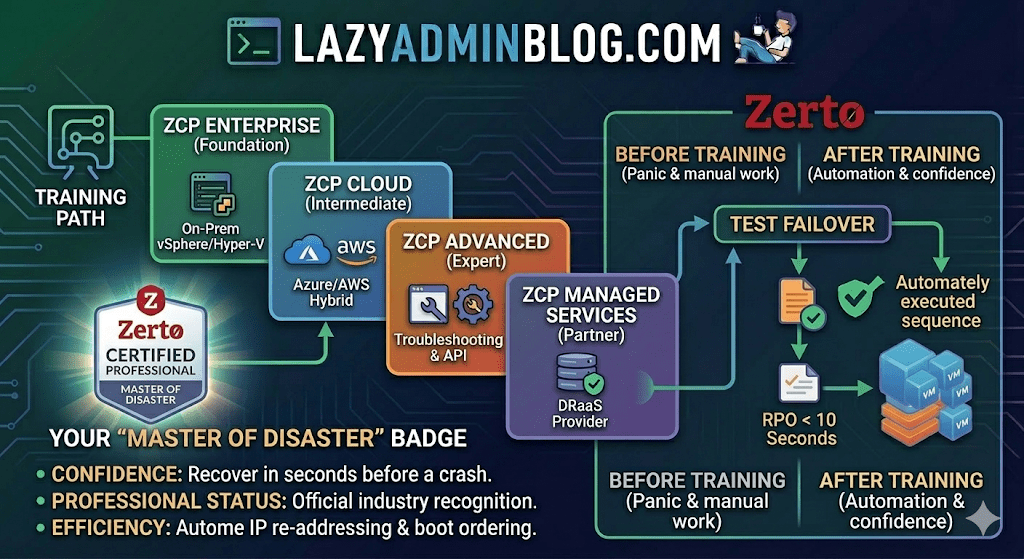
In the world of Disaster Recovery, there are two types of admins: those who panic during an outage, and those who have “Master of Disaster” status.
If you’re looking to join the elite ranks of the latter, it’s time to talk about Zerto Certified Professional (ZCP) training. While the original ZVR 4.5 training was a game-changer for its time, Zerto’s training ecosystem has evolved significantly since then to keep pace with modern cloud and ransomware threats.
What is ZCP Training?
Zerto Certified Professional (ZCP) is the official technical certification program designed for customers and partners. It moves you beyond the basics of “click and replicate” into the deep engineering of Continuous Data Protection (CDP).
The current curriculum has shifted from just “Basic” to a more modular, role-based approach available through the myZerto University platform.
Key Learning Pillars:
- Architecture & Installation: Setting up the Zerto Virtual Manager (ZVM) and Virtual Replication Appliances (VRAs).
- VPG Management: Creating Virtual Protection Groups (VPGs) to keep multi-VM applications consistent.
- The “Time Machine” (Journal): Master file-level restores and point-in-time recovery to defeat ransomware.
- The Big Red Button: Coordinating Test Failovers, Live Failovers, and Move operations without breaking a sweat.
Is it still “Basic”?
Zerto has streamlined its certifications into several paths to match your specific environment:
| Certification | Level | Focus Area |
| ZCP Enterprise | Foundation | Core vSphere/Hyper-V to On-Prem replication. |
| ZCP Azure/AWS | Intermediate | Hybrid Cloud DR and migration to public clouds. |
| ZCP Advanced | Expert | Complex troubleshooting, multi-site, and API automation. |
| ZCP Managed Services | Partner | Specifically for DRaaS (Disaster Recovery as a Service) providers. |
Why Bother Getting Certified?
- Confidence: Knowing exactly how the journal works means you can recover data from seconds before a crash.
- Professional Status: It officially recognizes you as a “Master of Disaster” within the community.
- Efficiency: You’ll learn the “Lazy Admin” way to automate IP re-addressing and boot ordering, so you don’t have to do it manually during a crisis.
How to Get Started
- Access: Head over to the myZerto Portal. (Note: You still need to be a customer or partner to access full technical training).
- Time Investment: Most foundational courses take between 90 minutes and 3 hours of self-paced e-learning.
- The Exam: You’ll typically need a 75% or higher to pass. The exams are online, unproctored, and refreshingly focused on real-world scenarios rather than trivia.
Lazy Admin Tip: Don’t just watch the videos. If you have a lab environment, try to break a VPG and see how the ZVM alerts you. Real learning happens when the lights go red!