
Azure Default Outbound Access Retirement
Azure Alert: Default Outbound Access Ends March 31st
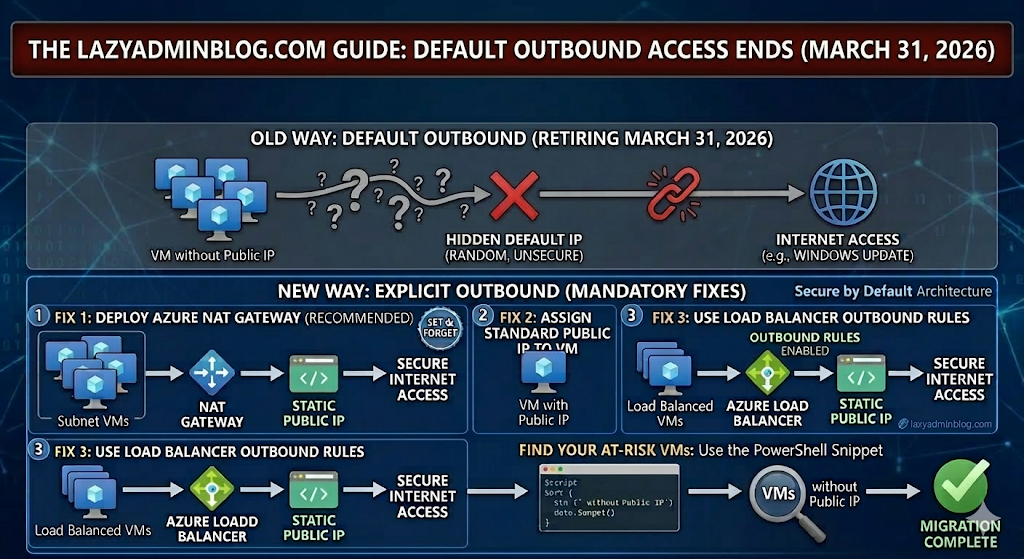
Is your “Internet-less” VM about to lose its connection? Here is the fix.
For years, Azure allowed Virtual Machines without an explicit outbound connection (like a Public IP or NAT Gateway) to “cheat” and access the internet using a default, hidden IP. That ends on March 31st 2026. If you haven’t transitioned your architecture, your updates will fail, your scripts will break, and your apps will go dark.
1. What exactly is changing?
Microsoft is moving toward a “Secure by Default” model. The “Default Outbound Access” (which was essentially a random IP assigned by Azure) is being retired. From now on, you must explicitly define how a VM talks to the outside world.
2. The Three “Lazy Admin” Solutions
You have three ways to fix this before the deadline. Choose the one that fits your budget and security needs:
Option A: The NAT Gateway (Recommended)
This is the most scalable way. You associate a NAT Gateway with your Subnet. All VMs in that subnet will share one (or more) static Public IPs for outbound traffic.
- Pro: Extremely reliable and handles thousands of concurrent sessions.
- Con: There is a small hourly cost + data processing fee.
Option B: Assign a Public IP to the VM
The simplest “Quick Fix.” Give the VM its own Standard Public IP.
- Pro: Immediate fix for a single server.
- Con: It’s a security risk (opens a door into the VM) and gets expensive if you have 50 VMs.
Option C: Use a Load Balancer
If you already use an Azure Load Balancer, you can configure Outbound Rules.
- Pro: Professional, enterprise-grade setup.
- Con: More complex to configure if you’ve never done it before.
3. How to find your “At Risk” VMs
Don’t wait for March 31st 2026 to find out what’s broken. Run this PowerShell snippet to find VMs that might be relying on default outbound access:
# Find VMs without a Public IP in a specific Resource Group$VMs = Get-AzVM -ResourceGroupName "YourRGName"foreach ($vm in $VMs) { $nic = Get-AzNetworkInterface -ResourceId $vm.NetworkProfile.NetworkInterfaces[0].Id if ($null -eq $nic.IpConfigurations.PublicIpAddress) { Write-Host "Warning: $($vm.Name) has no Public IP and may rely on Default Outbound Access!" -ForegroundColor Yellow }}🛡️ Lazy Admin Verdict:
If you have more than 3 VMs, deploy a NAT Gateway. It’s the “Set and Forget” solution that ensures you won’t get a 2 AM call on April 1st when your servers can’t reach Windows Update.
 Lazy Admin Blog